
Prepare · respond · recover
For you and your loved ones, when disaster strikes.
Koruya helps you prepare, find trustworthy information when disaster strikes and tell the people you love “I'm safe”. It is designed to stay with you when the connection drops.
Koruya is not an official warning system and does not replace official warnings or emergency lines. If your life is in danger, call your country's emergency number.


The Home screen, from its own parts: the app's real components, sample data · İstanbul - Beşiktaş
In short
What is Koruya?
Koruya is a mobile app that helps you prepare for disasters, reach information published by official agencies and scientific networks when one strikes, and tell the people you love “I'm safe”. It brings maps, guides, a preparedness plan and emergency tools for earthquakes, floods, wildfires, storms and other disasters into one place, and some of them work without internet. Koruya is not an official warning system: if your life is in danger, call your local emergency number.
- Status
- In closed testing; not yet on the App Store or Google Play.
- Platforms
- iPhone and Android first. Phase 1 of the web app is open at app.koruya.app (no SOS, push notifications or Bluetooth; the Bluetooth relay is experimental on mobile too and not yet on in the store version). There is no watch app; one is planned.
- Price
- Life-saving features are free for everyone, always. The optional Koruya+ and Koruya Pro plans are switched off and have no price yet.
- Languages
- 10 languages: Turkish, English, German, French, Spanish, Arabic, Russian, Portuguese, Hindi and Chinese.
- Account
- Works without an account. A family group needs a Koruya account with a confirmed e-mail.
- Offline
- Downloaded map packs, your saved details, guides and emergency tools open without internet. New disaster information needs a connection.
- Data sources
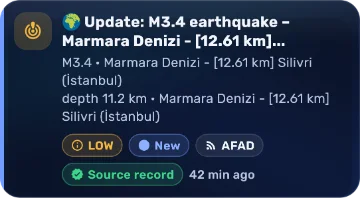
- Sources such as USGS, EMSC, GDACS and NASA EONET; every record shows the source's name, its time and what kind of record it is.
- Not official
- Not an official warning system or an earthquake early-warning system; it does not replace official warnings or emergency lines.
Why Koruya
A disaster is never a single moment. There is a before: a plan, a bag, knowing what to do. There is the moment itself: the right source, quick word to family. And there is an after: the people you love, safe places, recovery. Koruya is with you in all three, even when the internet is gone.
Four moments of a disaster
Koruya is with you at every moment
Scroll through a disaster from before to after, and see what Koruya does at each step.
01Before a disaster
Preparing starts today
Make a plan with your family, pack your emergency bag and learn what to do in advance. Koruya walks you through it step by step.
- Household plan and meeting point
- Emergency bag checklist; preparedness reminders in your calendar
- Koruya Learn: short lessons with sources
Learn more Earthquake: Open the guide
The app's real components · sample data · İstanbul - Beşiktaş


02When it strikes
The right information, quick word
Find what you need with one tap, even in a panic. Records published by official agencies and scientific networks, with their source and time.
- Nearby earthquake and disaster records on a map and a list
- Emergency call shortcut: you start the call
- Share “I'm safe” with your family group in one tap
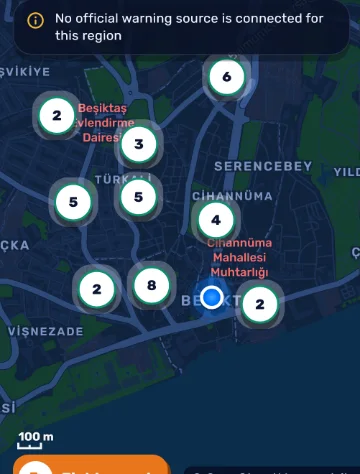
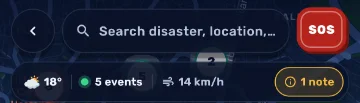
- Events Earthquake and disaster records with their source and time; the same quake from several sources is merged.
- Critical places Hospitals, pharmacies, fire stations and assembly areas; they open offline in an area you downloaded.
- Honest gaps If no official warning source is connected for the area, the map says so plainly.
Learn more Flood: Open the guide
The app's real components · sample data · İstanbul - Beşiktaş

03When the connection drops
Keeps working without internet
The internet is one of the first things a disaster cuts. Map packs you downloaded, your saved details and the guides stay on your phone.
- Critical places like hospitals, pharmacies and assembly areas, offline
- Guides show their source and the date they were checked
- Relay through nearby phones: experimental, mobile only; not yet on in the store version
Learn more Landslide: Open the guide
The app's real components · sample data · İstanbul - Beşiktaş


04With your loved ones
Is everyone all right?
The first question after a disaster is always the same. See your loved ones' latest status in your family group; “unknown” is never shown as “safe”.
- Family group and one-time QR invite
- Family tasks and safety circles
- Your location is visible only if you turn sharing on
Learn more Tsunami: Open the guide
The app's real components · sample data · İstanbul - Beşiktaş

For an earthquake
Before, during and after a disaster
The first steps of the app's earthquake guide; the full guide comes with its official sources.
-
Before a disaster
Get ready
- Secure heavy furniture, appliances and things that hang on walls. Ready.gov (FEMA)
- Practise how to protect yourself with the people you live and work with. Ready.gov (FEMA)
- Fix large heavy furniture, appliances and electronics that could tip over or slide to the wall or the floor. AFAD (Bursa İl Müdürlüğü)
-
During the shaking
Protect yourself
- Drop to your hands and knees, cover your head and neck, and hold on until the shaking stops. Ready.gov (FEMA), AFAD
- If you are inside, stay inside. Do not run outside, and avoid doorways. Ready.gov (FEMA), AFAD
- If you are outside, stay outside, away from buildings, trees, streetlights and power lines. Ready.gov (FEMA), AFAD
-
After the shaking
Check in, stay safe
- Expect aftershocks. Do not enter damaged buildings. Ready.gov (FEMA), AFAD
- If you are trapped, send a text or bang on a pipe or wall; use a whistle instead of shouting. Ready.gov (FEMA), AFAD
- Check yourself and the people with you for injuries. Help others if you have training. Ready.gov (FEMA), AFAD (Bursa İl Müdürlüğü)
Everywhere
On your phone, in your browser, soon on your wrist
Koruya comes to iPhone and Android; the first phase of the web app is open. Watches are next; we do not show what is not ready as if it were.


- iPhoneComing soon to the App Store Coming soon
- AndroidComing soon to Google Play Coming soon
- Webapp.koruya.app · phase 1 open Phase 1
- Apple WatchPlanned; no watch app yet Planned · Coming soon
- Wear OS watchesPlanned; no watch app yet Planned · Coming soon
The browser shows today’s koruya.app website (a real page screenshot). The web app is at app.koruya.app (phase 1). The watch screens are drafts of a planned design; Koruya has no watch app today. The phone screens are the app's real screens: the app's own interface with sample data (place İstanbul - Beşiktaş, app in English; events, weather and family roles are samples, no real person). The watch pictures are illustrations.
Privacy
Your data is yours
In a disaster, trust is everything. That is why our principles are clear and written down.
-
Your personal data is never sold
We do not sell or rent your data, and we do not use it for advertising.
-
Works without an account
Without an account, your information stays on your phone only.
-
Location only when needed
Location permission is asked the first time a feature needs it; in the background it is used only when you start an SOS.
-
Sensitive details encrypted
Sensitive records such as your medical card and plans are encrypted on your phone.
Store reviews
Reviews, after release
Koruya is not in the stores yet, so there are no reviews here.
No reviews yet
When the app is released, real App Store and Google Play reviews will appear here.
- Reviews come from the stores; we do not change their text.
- The reviewer's name is not shown.
- We never invent ratings, reviews or download counts.
App StoreAfter release
Google PlayAfter release
Download
Koruya is coming to the stores
Koruya is in closed testing. When it is released, the store links will be here.
- For iPhoneApp StoreComing soon
- For AndroidGoogle PlayComing soon
- In your browser, with your Koruya account · phase 1Web appPhase 1
The web app does not have every feature of the mobile app: no SOS, no push notifications, no Bluetooth (relay through nearby phones is experimental on mobile too and not yet on in the store version). It does not guarantee to warn you; for warnings, use the mobile app and official channels.
Features may change before the first release. Official store badges will be added at release.

Questions
In short
Is Koruya an official warning system?
No. Koruya brings together information published by official agencies and scientific sources; it does not replace official warnings or emergency lines. Always follow announcements from the authorities.
Does it cost anything?
Disaster information and the emergency tools are free and need no account.
Does it work without internet?
Map packs you downloaded, your saved details and the guides open without internet. New disaster information and messages to your family need a connection.
Do I need an account?
No. You can use Koruya without one. Features such as the family group and moving your details to a new phone need an account.
Preparing starts today.
When Koruya is released, you will hear it here first. Questions or ideas? Write to us: support@koruya.app